How One Prompt Builds Powerful Website Tools
With a single instruction, you can generate a complete, secure, and accessible PHP tool—complete with admin panel, frontend, and PayPal integration. Here's how it works and what you can build.
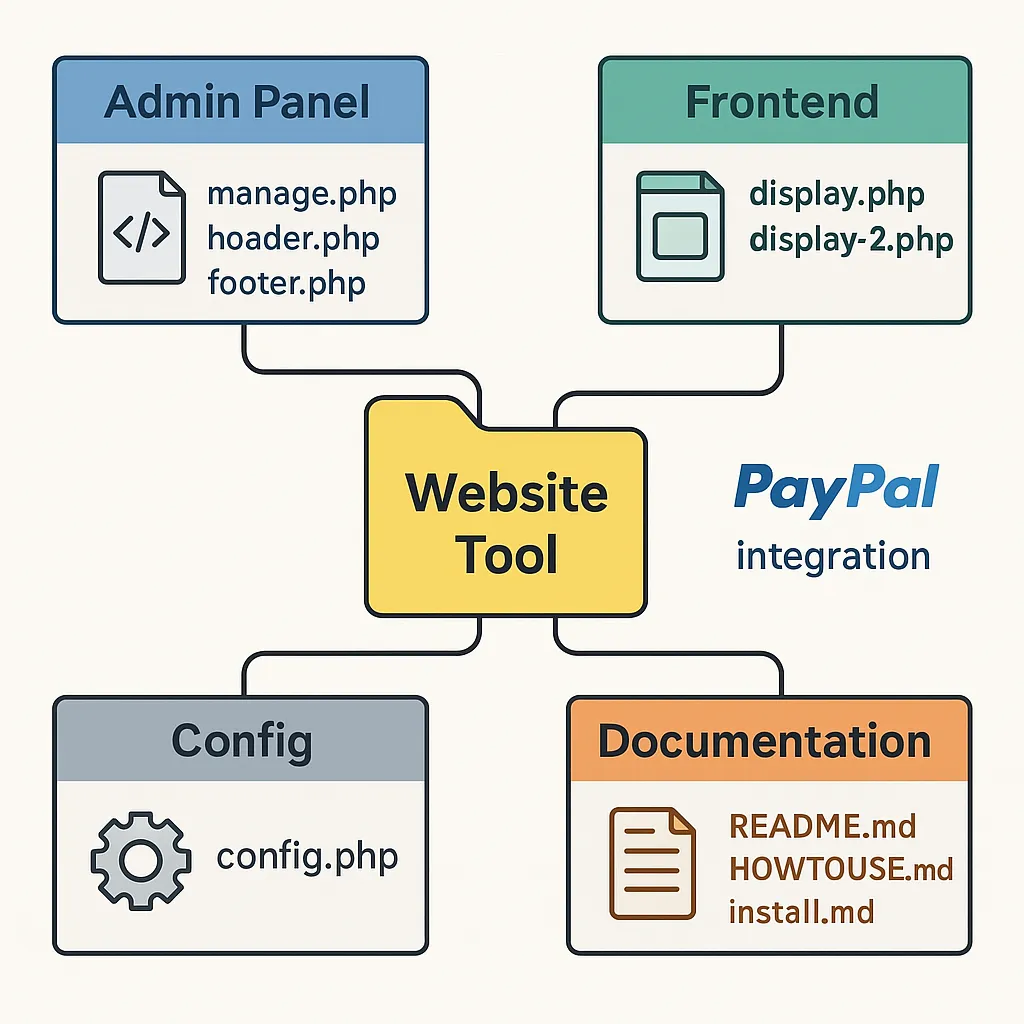
What Makes This Prompt Different
This AI prompt builds full modular web tools with semantic HTML5, secure PHP (PDO only), and accessible Bootstrap 5.3 UIs. You get an entire deploy-ready ZIP with config, admin, frontend, and full documentation—no frameworks, no fluff.
- PHP 8.2+ with PDO and full error handling
- MySQL InnoDB, utf8mb4, secure CRUD operations
- Bootstrap 5.3 layout + custom
theme.css - Font Awesome 7 Pro icons (jelly + classic)
- Semantic HTML5 with full accessibility
- Complete documentation: Setup.md, install.md, README.md, HOWTOUSE.md
"Think of this prompt like your own senior dev. It scaffolds everything—secure config, admin UI, display templates, and documentation—so you can launch tools in hours, not weeks."
What Can You Build with This Prompt?
Below are 15 real-world tools this prompt can generate. Each includes admin controls, secure database access, Bootstrap frontend, and optionally PayPal support.
Business & Internal Tools
- CRM Intake: Capture and manage leads, notes, and tags. Export CSVs. Great for small teams or solopreneurs.
- Inventory Tracker: View, edit, and restock items. Searchable interface, alerts, and vendor fields.
- Team Bio Cards: Add team bios and display as filterable, responsive cards.
- Time-Off Manager: Staff submit requests. HR backend for approval and tracking.
- Prompt Library Tool: Tag, save, and organize internal GPT prompts. Add voting and usage stats.
Public-Facing Applications
- PayPal Donation Cards: Accept donations. Admin dashboard includes donor export and reporting.
- Event RSVP + Tickets: Frontend form with ticket options. Admin panel manages attendance + QR check-in.
- Real Estate Listings Grid: Upload homes, features, and pricing. Filterable frontend display with photos.
- Story Submissions: Visitors submit testimonials or stories. Admin moderation + public quote display.
- FAQ Voting System: Vote up helpful FAQs. Admin panel with analytics and sorting.
Specialized Utilities
- Warranty Registration: Form collects buyer/product data and confirms registration with PDF output.
- ZIP Directory Tool: Return city/state info + regional managers for entered ZIP codes.
- Blog Draft Collector: Admin UI to collect blog drafts with tags, status, and exports to Markdown.
- Quill.js WYSIWYG Poster: Save styled HTML content to the DB and render for review or display.
- Form-to-JSON API Builder: Convert form submissions to a public API feed. Great for galleries or databases.
Prompt Enhancements That Make it Even Better
- “Add image validation + thumbnail generation” for listing or bio pages.
- “Enable ZIP lookup API integration” to autofill city/state from ZIP.
- “Export data to PDF” for confirmations, certificates, or invoices using dompdf.
- “Include cron script to clear expired entries” for deals, RSVPs, or listings.
Use phrases like
“Add multi-language toggle” or “Enable admin roles with permissions” in your prompt to extend logic.
Frequently Asked Questions
How do I install tools built with this prompt?
Each ZIP includes install.md, Setup.md, and README.md for local, WHM, or cPanel use.Can I switch Bootstrap to Tailwind?
Not easily. This prompt is built around Bootstrap 5.3. Switching requires rewriting most frontend structure.Is PayPal required?
No. PayPal is only added if your tool needs payment processing. Stripe can be requested too.What’s the required tech stack?
Apache + PHP 8.2+, MySQL InnoDB, utf8mb4_unicode_ci, and PDO only.What Is the Website Tool Builder Prompt?
The Website Tool Builder Prompt is a structured instruction designed for use with AI models like ChatGPT. It enables the automatic generation of fully-functional website tools written in PHP and MySQL, complete with admin dashboards, front-end displays, payment integration, and responsive, accessible design. Each tool is modular and plug-and-play, meaning it can be dropped into existing PHP websites or used as standalone web apps.
This prompt ensures that the output follows modern web development best practices—including semantic HTML5, WCAG 2.1 accessibility, responsive Bootstrap 5.3 layouts, and secure database interaction using PDO. It doesn't rely on frameworks, making it lightweight and compatible with nearly any PHP hosting environment (WHM, cPanel, or local server).
Why This Prompt Was Created
Web developers and small teams often waste hours scaffolding basic website tools—form handlers, admin dashboards, CRUD interfaces, and donation forms. This repetitive work, while essential, is tedious and error-prone. The Website Tool Builder Prompt eliminates this friction. It was created to serve developers and mission-driven organizations who need secure, flexible, accessible web tools without the bloat or complexity of modern frameworks.
From nonprofits accepting donations to schools showcasing student awards or real estate agents managing listings, this prompt empowers users to launch custom tools in hours rather than days. And with built-in documentation and ready-made file structures, even non-developers can deploy solutions with minimal technical guidance.
What’s Included in the Output?
The tool generated by this prompt includes a strictly defined folder and file structure:
manage.php— Admin dashboard with CRUD logicdisplay.phpanddisplay-2.php— Front-end public templates/inc/config.php— Secure PDO connection/inc/header.php,footer.php,footer-close.php— Layout includesREADME.md— Project overviewSetup.md— Step-by-step guide to setting environment variables/API keysinstall.md— Hosting-specific installation instructionsHOWTOUSE.md— 5 real-world examples of how to use the tool
These elements are designed to work together in a portable ZIP, enabling you to upload and deploy instantly with zero dependency management.
How the Prompt Interacts with AI
The prompt guides the AI step-by-step through building the tool, enforcing a tone and flow that feels like working with a senior engineer. The AI is instructed to:
- Ask clarifying questions only when essential
- Show enthusiasm exclusively for the build process
- Adhere strictly to rules like PDO-only, Bootstrap-only, and modularity
- Provide a complete ZIP-ready package of output
By setting these constraints, the AI knows exactly what to generate and how to do it without deviating. This reduces guesswork, improves the quality of code, and accelerates delivery.
Who This Prompt Is For
This prompt was created with the following users in mind:
- Freelance developers who want to spin up custom tools for clients quickly
- Nonprofits and schools needing donation trackers, award portals, or RSVPs
- Marketing and operations teams seeking self-managed CRMs, form-to-API tools, or project dashboards
- Agencies looking to prototype tools with reusability baked in
Because the code is well-structured, documented, and doesn't rely on frameworks, it's also ideal for onboarding junior developers or deploying across different environments consistently.
How to Get the Most Out of the Prompt
To maximize the power of this prompt, use specific, structured language. Try prompts like:
Create a donation card manager that saves donor info and sends receipts via PayPal.Build a form that lets users submit project ideas and allows admins to approve them.Make a tool to manage FAQs with upvote/downvote and searchable categories.
You can further enhance by appending requests like:
Add PDF export of submitted entries.Include support for ZIP-to-city autofill.Use custom Bootstrap color variables prefixed with 'kw-*' from theme.css.
By providing focused, detailed inputs, the AI will build tools that are almost production-ready without needing a separate dev sprint.